Pointing your domain’s nameservers to Hostlag is a foundational move for Nigerian businesses ready to unlock top-tier local hosting, faster site speeds, and seamless support. Whether you registered your domain elsewhere or you’re consolidating your digital assets, updating nameservers is simple—and it puts your website’s destiny in your own hands.
Why point your nameservers?
Nameservers act as the “traffic directors” of the web, ensuring every visitor to your domain lands on the right server. By pointing your domain to Hostlag’s nameservers, you guarantee that your site loads from Hostlag’s robust, NVMe-powered infrastructure—maximizing uptime, performance, and security.
Follow these steps to point your domain nameservers to Hostlag:
Login to your Hostlag client area.
(Forgot your password? Use the password reset link for instant access.)
Click on “Domains.”
You’ll see a list of all your registered domains.
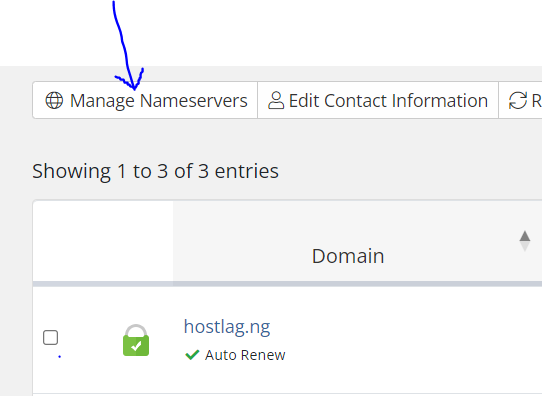
Tick the checkbox beside the domain you wish to update.
Click on “Manage Nameservers” (located above your domain’s name).
Enter Hostlag’s nameservers:
Click “Change Nameservers.”
That’s it! Your domain is now pointed to Hostlag, and your website will soon be powered by reliable, Nigerian-based hosting.
Need help?
Hostlag’s support team is always ready—email support@hostlag.com or WhatsApp +2349139168118 for quick, friendly assistance.
With these steps, your web presence is set to thrive on Hostlag’s trusted platform.
